
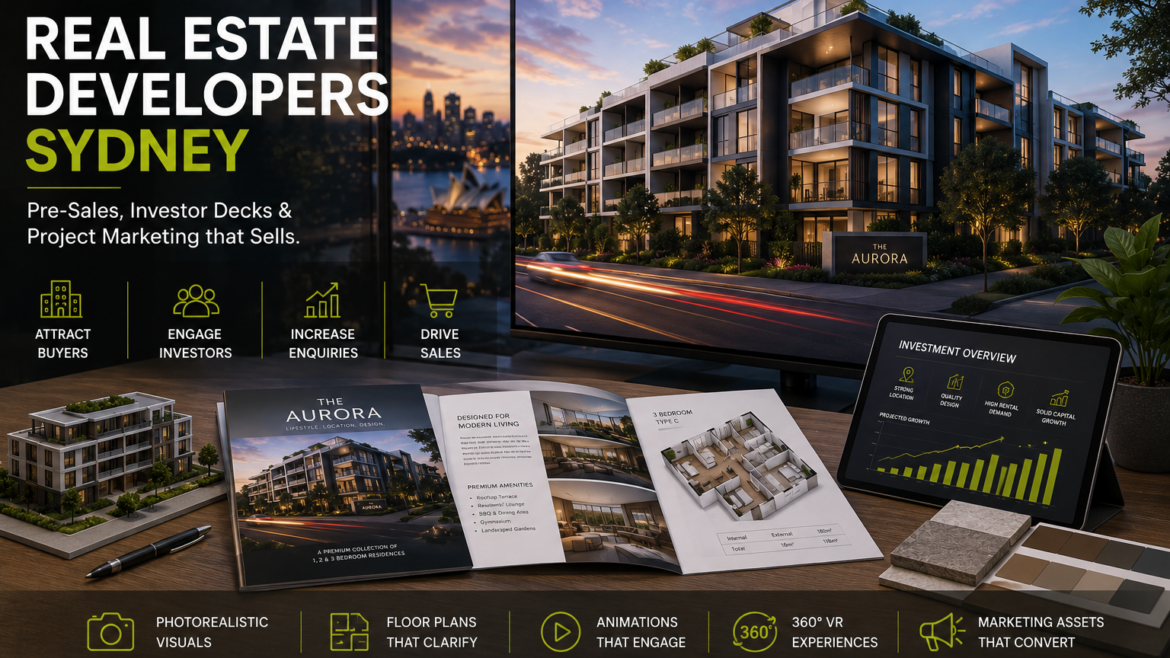
3D Rendering for Real Estate Developers in Sydney: Pre-Sales, Investor Decks & Project Marketing
Sydney Developer Visualisation
3D Rendering for Real Estate Developers in Sydney: Pre-Sales, Investor Decks & Project Marketing
3D rendering for real estate developers in Sydney helps project teams present apartments, townhouses, mixed-use developments and residential communities before construction is complete. From exterior hero renders and interior visuals to 3D floor plans, animations and 360 VR experiences, visual content can support project marketing, investor communication and buyer understanding.

Real estate development often requires strong visual communication before the final project is physically ready. Buyers may need to understand the lifestyle offering, investors may need to understand the vision, and internal teams may need clear assets for approvals, marketing and sales planning.
This is where real estate 3D rendering Sydney services can support the project. Renders can translate architectural drawings, floor plans, interior concepts and material selections into visual assets that are easier to use across campaigns, meetings and presentations.
For Sydney developers, 3D visualisation can be useful across apartments, townhouses, duplexes, residential estates, mixed-use projects, commercial developments and renovation-led property campaigns.
For location-specific project support, view our dedicated 3D rendering services in Sydney. For broader developer-focused services, visit our 3D rendering for real estate developers in Australia page.
Why Real Estate Developers in Sydney Use 3D Rendering
Development projects often need visual assets before construction, fit-out or staging is complete. A well-planned visual package can help communicate the project clearly to different audiences, from buyers and investors to sales teams and consultants.
1. To Present the Project Before Completion
Renders help show the future appearance of a project when completed photography is not yet available. This is useful for pre-launch, off-the-plan and under-construction marketing stages.
2. To Support Buyer Understanding
Buyers may find it difficult to understand a development from plans alone. Exterior renders, interior visuals and 3D floor plans help explain the layout, lifestyle and design direction in a more accessible way.
3. To Build Consistent Campaign Assets
A single visualisation package can support brochures, website pages, social ads, email campaigns, presentation decks, display suite visuals and printed materials.
4. To Communicate with Investors and Stakeholders
Investor decks, funding presentations and stakeholder updates often benefit from visuals that explain the scale, product mix, design direction and market positioning of the project.
Important 3D Visual Assets for Sydney Property Developers
Different stages of a development may require different visual assets. A launch campaign may need hero renders and interiors, while a sales presentation may need unit plans, amenities and walkthroughs.
| Visual Asset | What It Shows | Where It Can Be Used |
|---|---|---|
| Exterior Hero Render | Facade, street presence, architecture, landscaping, entry and overall development character. | Project website, brochure cover, hoarding, investor deck, advertising creative. |
| Interior Apartment Renders | Living room, kitchen, bedrooms, bathroom, finishes, furniture and lifestyle mood. | Sales brochures, listing pages, social media, display suite material. |
| 3D Floor Plans | Unit layouts, room flow, furniture arrangement, balconies and spatial relationships. | Unit comparison, brochure pages, real estate listings, buyer presentations. |
| Amenity Renders | Lobbies, rooftop areas, gyms, lounges, gardens, pools, co-working or shared spaces. | Lifestyle marketing, project website, campaign creatives and display presentations. |
| Architectural Animation | Movement through exterior, entry, interiors, amenity spaces and development experience. | Launch videos, website hero videos, social ads, sales presentations. |
| 360 VR Experience | Interactive space experience where users can look around selected rooms or areas. | Remote buyer presentations, display suite support and premium project marketing. |
The right visual package depends on the project stage, budget, launch timeline, audience and marketing channel. Some developments need only a few hero visuals, while others benefit from a full suite of property marketing renders Sydney assets.
How 3D Renders Support Pre-Sales and Project Marketing
Pre-sales and off-the-plan marketing depend heavily on clarity. Buyers need to understand what is being offered before the property is complete. 3D renders can help communicate the project story through visuals.
Project Landing Pages
Hero renders, interior visuals and floor plans can make development landing pages more complete and easier to understand.
Sales Brochures
Developers can use exterior, interior and floor plan visuals in downloadable or printed brochures to explain the offer more clearly.
Social Media Campaigns
Renders can be adapted for social posts, lead-generation ads, carousel creatives and launch announcements.
Display Suite Material
Large-format renders, floor plans and animations can support the buyer journey inside a display suite or sales office.
Email and Remarketing
Visuals can be reused across email updates, retargeting creatives, buyer follow-ups and project launch sequences.
Listings and Portals
Rendered visuals and 3D floor plans can support property listings where final photography is not yet available.
For layout-focused assets, you can also explore 3D floor plans in Sydney. For room visuals, visit interior 3D rendering in Sydney.
Using 3D Renders in Investor Decks and Stakeholder Presentations
Developers often need to communicate the project vision to investors, consultants, partners and internal stakeholders. A deck that only includes numbers, drawings and written descriptions may not fully express the project’s design value or market positioning.
Project Vision
Exterior renders and master visuals can show the development concept, scale, architectural style and overall character.
Product Mix
3D floor plans and interior visuals can help explain different apartment types, townhouse layouts, room configurations and amenity areas.
Market Positioning
Visual style can support how the project is positioned — premium, family-friendly, urban, lifestyle-focused, boutique or design-led.
Presentation Clarity
Renders make the presentation easier to follow for stakeholders who may not be familiar with architectural drawings.
Preparing a Sydney development launch or investor deck?
Share your drawings, project positioning, unit mix or campaign direction. Our team can review the scope and suggest a suitable visualisation package based on your project requirement.
How a Developer 3D Rendering Workflow Usually Works
A real estate development visualisation project usually includes multiple assets, so the workflow needs to be planned carefully.
Project Scope Review
The team reviews drawings, development type, marketing purpose, required asset list, audience and launch requirements.
Asset Planning
The visual package is planned — exterior views, interiors, unit floor plans, amenity visuals, animation or VR depending on the project.
3D Modelling
Buildings, interiors, amenities, layouts, furniture and context are modelled based on the supplied project information.
Materials & Styling
Facade finishes, interior palettes, landscape elements, furniture and lighting moods are added to match the project direction.
Draft Review
Draft visuals are reviewed, with feedback applied according to the agreed scope and campaign priorities.
Final Delivery
Final files are prepared in formats suitable for websites, brochures, sales decks, listings, social media, print or video channels.
3D Rendering Brief Checklist for Sydney Developers
A detailed brief helps the visualisation team understand the project and prepare the right asset plan.
Files to Share
- Architectural plans, elevations and sections
- CAD files, PDFs or design drawings
- Site plan and landscape plan if available
- Unit layouts and floor plans
- Facade material schedule and colour references
- Interior finish schedule and mood boards
- Brand, brochure or campaign direction
- Required asset list and final usage format
Questions to Confirm
- Is the visual package for pre-sales, investor deck or campaign launch?
- How many exterior, interior and floor plan assets are needed?
- Are amenity spaces required?
- Do you need animation or 360 VR?
- What is the target audience — buyers, investors, agents or internal teams?
- Will the visuals be used online, in print, in ads or in a display suite?
- Should the visual style feel premium, boutique, urban, coastal or family-focused?
Common Mistakes Developers Should Avoid with 3D Rendering
3D renders are most useful when they are planned around the campaign and audience. Below are a few common mistakes to avoid.
Creating Renders Without a Campaign Plan
Before production starts, confirm where each visual will be used — website, brochure, social media, sales deck, hoarding or display suite.
Not Planning the Full Asset Set
A project may need more than one hero render. Developers should consider whether interiors, floor plans, amenities and animations are also required.
Using Unclear Material References
Facade, interior and landscape references should be shared clearly so the renders align with the design direction and marketing position.
Ignoring Buyer Understanding
Renders should not only look attractive. They should also help buyers understand layout, lifestyle, space, finishes and overall value proposition.
Helpful Internal Resources
- 3D Rendering Services in Sydney
- 3D Rendering for Real Estate Developers
- Architectural Visualisation in Sydney
- 3D Rendering Services in Sydney Guide
- Exterior 3D Rendering in Sydney
- Interior 3D Rendering in Sydney
- 3D Floor Plans in Sydney
- Architectural Animation Services
- 360 VR Experience Services
- 3D Rendering Portfolio
- 936 Kendon DR Exterior Rendering Case Study
- Contact 3D Space Design
Please update any internal URLs if the final live slug differs from the suggested structure.
Frequently Asked Questions About 3D Rendering for Sydney Real Estate Developers
How do real estate developers use 3D rendering in Sydney?
Developers use 3D rendering to present projects before completion. Visuals can support pre-sales, investor decks, project websites, sales brochures, social media campaigns, display suite material and listing presentations.
What types of renders are useful for property developers?
Useful assets include exterior hero renders, interior apartment renders, 3D floor plans, amenity renders, architectural animations, walkthroughs and 360 VR experiences.
Can 3D renders be used for off-the-plan property marketing?
Yes. 3D renders are commonly used for off-the-plan marketing because they help communicate the future appearance, layout and lifestyle of a project before completed photography is available.
What files should a developer share before starting?
Helpful files include architectural drawings, elevations, sections, site plans, unit layouts, CAD files, material schedules, interior mood boards, campaign references and the required asset list.
Can one development project include multiple visual assets?
Yes. A development may include exterior views, interior renders, unit floor plans, amenity visuals, animation and 360 VR depending on the project scope and marketing requirement.
Can 3D renders be used in investor presentations?
Yes. Renders can help explain the project vision, product mix, architectural direction, lifestyle offering and market positioning in investor or stakeholder presentations.
How much does 3D rendering for developers cost in Sydney?
The cost depends on the number of assets, project complexity, modelling detail, interior and exterior requirements, animation or VR needs, revision scope and final output format. Sharing the project brief helps prepare a more accurate estimate.
Can developer renders be reused across marketing channels?
Yes. Depending on final resolution and format, renders can be adapted for websites, brochures, ads, social media, sales decks, display suite content and email campaigns.
Need 3D renders for a Sydney development project?
Send your drawings, project brief, unit plans or campaign direction. Our team can review the scope and suggest a visualisation package based on your project requirements.